KWGT Kustom Widget Maker
Screenshots
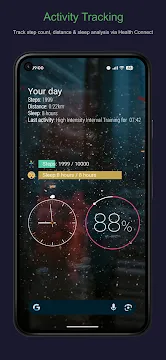
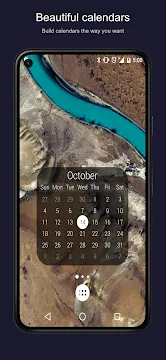
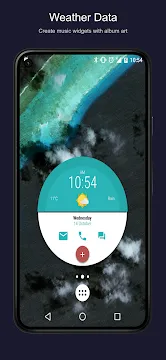
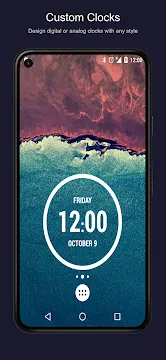
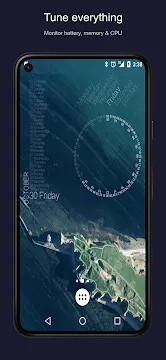
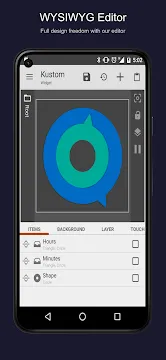
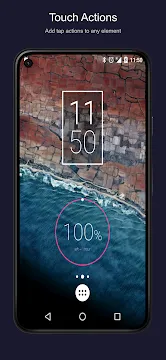
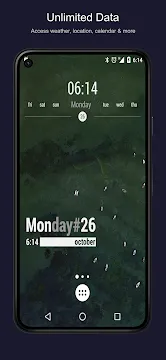
KWGT Kustom Widget Maker changes how you customize your smartphone screen. Many users want a unique look for their mobile devices. Therefore, they look for advanced customization tools. This App allows you to design custom widgets easily. You can modify layouts, shapes, fonts, and colors. Consequently, your home screen looks exactly how you want. Many people struggle with standard phone themes. However, you can change everything with the right tool. Let us explore how this tool works for your daily needs. It offers endless options for creative minds.
What is KWGT Kustom Widget Maker?
KWGT Kustom Widget Maker is a specialized design tool for your phone. It lets you create personalized widgets from scratch. For instance, you can display clocks, weather, and battery status. The App provides a blank canvas for your creativity. Because of this, you have total control over all visual elements.
First, you select a base size on your screen. Then, you open the editor to add various items. You can add text, shapes, and images. Furthermore, you can pull data from your system. For example, you can show live CPU usage. As a result, your screen becomes highly functional.
Many users love the deep customization options. You do not need coding skills to start. However, learning the interface takes some time. Once you understand the basics, the process becomes fun. You can build anything you imagine with some practice. It turns your screen into a personal canvas.
Key Features of KWGT Kustom Widget Maker
KWGT Kustom Widget Maker offers many features for creative users. These features help you build beautiful screen elements.
Here is a list of the main features:
- Custom text fonts and colors.
- Shapes like rectangles, circles, and polygons.
- Live data overlays for weather and astronomy.
- Advanced progress bars for battery life.
- Touch actions to launch other apps.
In addition, you can use complex math functions. These functions create dynamic changes based on time or location. Therefore, your widgets can change appearance throughout the day. For example, the background can darken at night. This happens automatically because of built-in triggers.
The App also supports external font packs. Thus, you can match your typography with any theme. You can create truly unique layouts with these tools. It makes customization accessible to everyone.
How to Create Your First Custom Design
Creating a widget requires a few simple steps. First, long-press on your empty home screen. Then, select the widget option from the menu. Scroll down until you find the App options. Choose a size and place it on your screen.
Next, tap the empty container to open the editor. You can start with a blank preset. Alternatively, you can choose a ready-made template. Ready-made templates save a lot of time for beginners.
After that, click the plus icon to add elements. Add a text item for a basic clock. Next, change the font size and color in the properties menu. You can also adjust the position easily. Finally, save your work by clicking the floppy disk icon. Your new creation will appear on your screen immediately. This process allows quick experimentation with styles.
Why You Should Choose KWGT Kustom Widget Maker
KWGT Kustom Widget Maker is highly popular among phone enthusiasts. There are several reasons for this widespread popularity. First, it does not slow down your device. Many live themes drain your battery quickly. However, this App uses system resources efficiently.
Second, the community support is massive. You can find thousands of pre-made setups online. Many creators share their designs for free. Therefore, you do not have to build everything yourself. You can download a pack and apply it instantly.
Furthermore, the developer updates the App regularly. These updates fix bugs and add new features. Consequently, the performance remains smooth over time. It works well on old and new devices alike. This reliability makes it an excellent choice for everyone. You get a stable tool for daily use.
Tips for Better Homescreen Customization
Good design requires planning and patience. Therefore, you should follow a few basic principles.
- Choose a consistent color palette first.
- Do not crowd your screen with too much information.
- Use high-quality wallpapers that match your widgets.
- Keep text readable against your background image.
First, pick a central theme for your phone. For example, a minimalist theme uses few elements. Then, design your widgets to match that specific style. If you use dark wallpaper, use light text colors.
In addition, group your essential tools together. Put your calendar and weather information in one place. This layout improves your daily productivity. Finally, backup your designs regularly. You can export your creations to external storage. This prevents data loss if you change your device. Proper planning gives you a cleaner interface.
Free Versus Pro Version Benefits
The App offers both free and paid options. The free version contains many useful tools. You can create complex layouts without spending money. However, the free version has some limitations.
For instance, you cannot import external presets easily. If you want to use community packs, you need the Pro key. The Pro key unlocks full importing capabilities.
Furthermore, the Pro version removes all advertisements. Ads can distract you during the design process. Therefore, buying the upgrade offers a better experience. It also supports the independent developer directly.
If you only want basic clocks, the free version is enough. But if you want advanced themes, get the Pro key. The choice depends entirely on your specific customization needs. Both options provide great value for users.
Conclusion
In conclusion, KWGT Kustom Widget Maker gives you complete control over your phone interface. You can design beautiful and informative tools for your daily use. The learning curve might seem steep at first. However, the results are worth the effort. You can transform your phone into a personalized masterpiece.
First, start with simple shapes and colors. Then, explore advanced data options as you learn. The community offers endless inspiration for new layouts. Consequently, you will never get bored of your screen design. Download the App today and start creating your unique custom layouts. Your perfect phone setup is just a few taps away.
- NetCut
- POCO Launcher
-
Samsung Wallpaper services
 Download
Samsung Wallpaper services
Samsung Wallpaper services provides automated background updates...
- Digital Wellbeing
- Android AICore
- Xiaomi Scanner
- Komi Store
- AdGuard VPN